Get the app
For No Reason on every device
No app store. It installs straight from your browser in one tap, then it lives on your home screen or desktop like any other app, with notifications.
Install the app
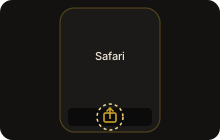 Open this page in Safari and tap Share.
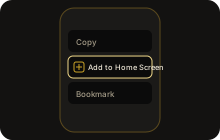 Scroll and tap Add to Home Screen, then Add.
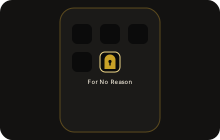 Open For No Reason from its new icon.
Apple allows no app downloads outside the App Store, so on iPhone and iPad the home-screen app is the way. It works like a normal app. Notifications need iOS 16.4 or newer.
This page is open inside another app, which cannot install apps. Copy the link and open it in Safari (iPhone) or Chrome (Android).
Installed. Open it from your home screen, Start menu or Dock.
Allow notifications
So the Chief, your Guide and your tasks reach you, with sound, like WhatsApp. Lock screens only ever show "New message" or "A new task is waiting", never a name or the text.
On iPhone: open For No Reason from the Home Screen icon, sign in, and tap Allow notifications there.
Notifications are on for this device. Sign in once and they start arriving.
Notifications are blocked for this site. Allow them in your browser's site settings (the lock icon next to the address), then come back.
Sign in
Or download the app file (Android, Windows, Linux)
Same app, packaged for your device: a custom notification sound, and on computers a tray icon and "start when I log in". The files are not yet signed by Microsoft or Apple, so your device shows a warning once. Check the SHA-256 if you like: it must match exactly. All checksums: SHA256SUMS.txt.
Android
Android 7.0 or newer · version 1.0.0 · 1.2 MB
SHA-256 1777c064ddf0937a859b7af7f7d316aa2af7cf510a41e90bb9035928734e3a07
Signing certificate (SHA-256) BC:44:97:CC:30:2E:C5:18:14:57:43:97:51:79:88:2F:59:AA:BA:A6:8E:85:D7:86:19:BC:15:A5:11:DE:7D:28
- Tap Download the APK, then open the file.
- Android asks to allow installs from your browser once: tap Settings, turn on Allow from this source, go back.
- Tap Install. If Google Play Protect says it does not recognise the app, tap More details > Install anyway. It is new, not unsafe.
- Open it, sign in, tap Allow notifications.
The app tells you itself when a new version is ready.
Windows
Windows 10/11 (Intel or AMD, 64-bit) · version 1.0.0 · 108 MB
SHA-256 fac130a80c942a15731d5918f192ab8483ae2167f91b92bed2bf118337ab25ed
Windows on ARM (e.g. Surface Pro X / Copilot+ PCs): ARM64 installer (102 MB, SHA-256 c895418afdc7e8380b1ee023057600193a37a58ad05ece06a409c7fdcd3196cc)
- Open the downloaded file.
- Windows says "Windows protected your PC" (unknown publisher): click More info > Run anyway.
- Choose where to install, finish, and the app opens. Closing the window keeps it in the tray (bottom right) so messages still reach you.
On some Windows 11 PCs Smart App Control blocks unsigned apps with no "Run anyway". Then use the Install button at the top: it is the same app. Updates install themselves after one click.
Mac
The Mac app file is being finished. Today, use the browser install at the top: in Chrome or Edge click Install; in Safari choose File > Add to Dock. It is the same app, with notifications.
Linux
Linux .deb (Ubuntu, Debian, Mint; 64-bit) · version 1.0.0 · 117 MB
SHA-256 c6c1d2fa89d75ae2f1ce3b3662a7eecaf05abe9616698df7d3b74c8e4b69cc0d
Install: sudo apt install ./ForNoReason-1.0.0-linux-amd64.deb (Ubuntu, Debian, Mint). Then find For No Reason in your apps.
An AppImage for other distributions is coming. Until then, the browser install at the top works in Chrome, Edge or Chromium.